Connect your school app to Anna, and stop digging through class posts
One sign-in, and Anna turns every permission slip, event notice and class story into a task, a calendar event or a reminder. Whichever app your school uses.
What Anna does with your school app
Turns notices into events
"Excursion Friday, 9am, return the form by Wednesday" becomes a calendar event and a task with the right due date, so nothing slips past a deadline.
Catches permission slips and forms
Anything that needs a signature or a reply gets surfaced as a to-do before it's late, not discovered the morning it's due.
Remembers what to bring
Library books, sports kit, a gold-coin donation, a costume for book week. It lands as a reminder on the day it's needed.
Filters the noise
A photo of the class hamster is lovely, but it's not a task. Anna leaves the FYI posts alone and only flags what actually needs you.
How to connect it, about a minute
There's no integration to request and nothing for your school to switch on. You ask Anna, she opens a secure browser window, and you sign in there.
Tell Anna which app to connect
In any chat, WhatsApp, SMS or the app, say "connect Compass", "connect ClassDojo", or whatever yours is called. That's the whole trigger.Anna opens a secure sign-in window
She sends you a link to a private, live browser window already pointed at that app's parent login. If your school runs its own portal on its own web address, she asks you for that address first instead of guessing and sending you somewhere wrong.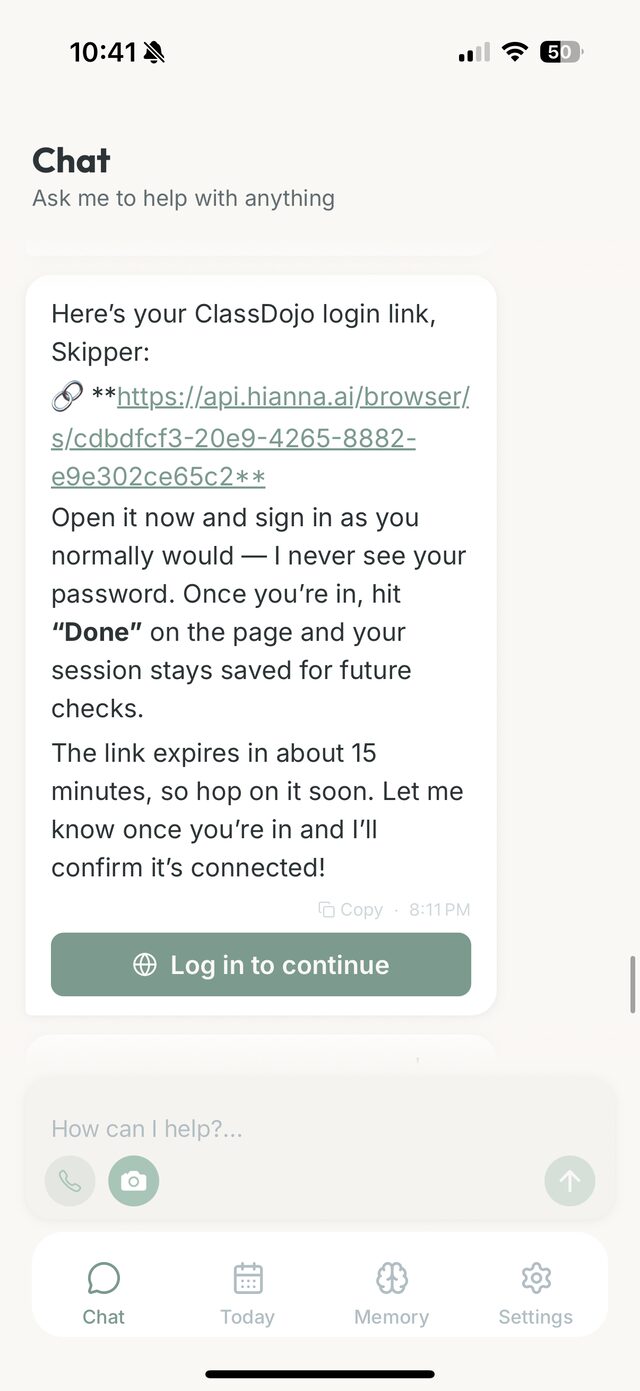
The link arrives right in your chat, with a reminder to tap Done once you're in. This example is ClassDojo; yours will name your own app. Sign in as you normally would
Enter your parent login in that window, the same details you'd use on the app itself. Anna never asks you for the password, it never lands in your chat, and nothing is kept afterwards except the signed-in session. If the portal offers both a password login and a "Continue with Google" button, use the password login: sign-in buttons from Google, Microsoft and Apple don't go through inside Anna's window.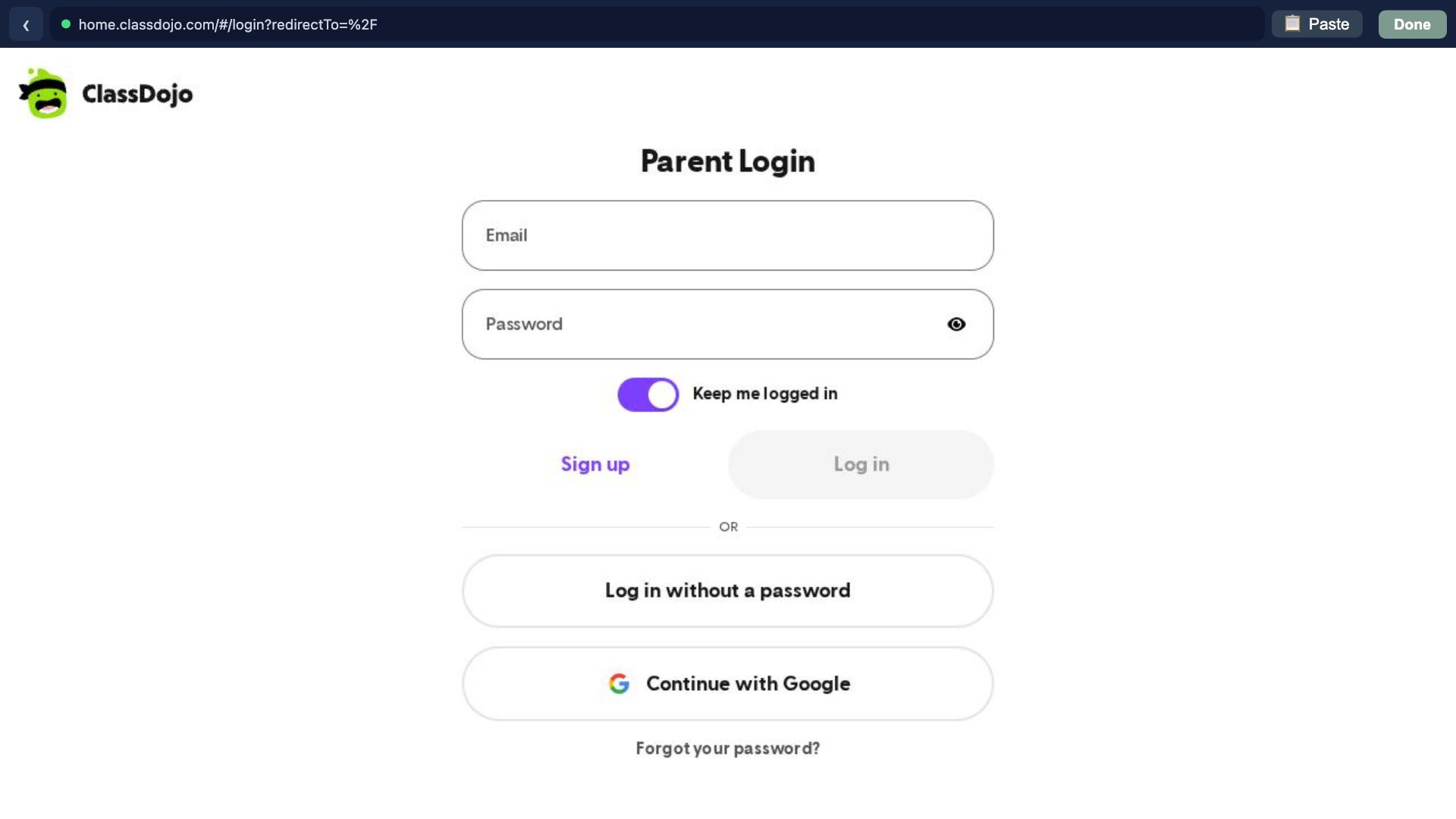
Tap "Done", and Anna checks it herself
She saves the connection, then does one real read of the portal to confirm she can actually get in. Only then does she tell you it's connected. After that it's hands-off.
Done sits in the top bar of that window, whatever app is loaded below it. Tapping it is what saves the connection to Anna.
Pro tip
Do the sign-in on the same phone where you chat with Anna, and tap Done once the feed or dashboard has actually loaded. That's what locks the connection in.
What happens after you connect
Anna checks on school days, around 8am, midday and 4pm in your timezone, so a morning notice reaches you before pickup rather than after. When something needs you it shows up as a task, an event or a reminder, with a one-line note on where it came from. When there's nothing new, she says nothing. School holidays go quiet for weeks, and that's just the portal being empty.
Two kids on two different systems is the ordinary case, not the awkward one. Connect each app and they all go on the same schedule; Anna keeps straight which notice came from where.
You stay in control. Every event or task she proposes is a yes or a no. Nothing lands on your calendar without you.
If Anna says the connection dropped, reconnecting takes 30 seconds
School portals sign you out from time to time. It's normal, and it happens on the school's side. Say "reconnect it" or tap the link in Anna's message, and she opens the secure sign-in window again. One login, tap Done, and she's watching once more. Nothing you saved before is lost.
Frequently asked
Why parents connect their school app to Anna
It's 8:41pm. The kids are finally down. You open the school app "just to check", and there it is: a permission slip due tomorrow, buried under three class stories and a reminder about Friday's excursion you'd already forgotten.
The app is where the school talks to you. The problem isn't the app. It's that everything important lives inside it, mixed in with the day to day, and it's on you to notice, remember and act before the deadline passes. Plenty of families are running two of them, one per child, on two different systems that don't know about each other.
That's the job Anna takes over. Connect it once and she watches it for you, pulling out the things that actually need a parent to do something and putting them where you'll see them: your tasks and your calendar. Ask Anna to set a reminder when you need a timed nudge.
Let Anna watch the school app so you don't have to
Connect yours in about a minute and stop finding the permission slip the night before it's due.
Open Anna and connect your school appRelated reading
Choosing an AI family organiser in Australia
Compare the job you need done, the sources you already use, the billing currency, and the steps that still need you. This guide is written by the team behind Anna, so treat our product description with that affiliation in mind.
guideYour Family's Data and Anna: The Security and Privacy Questions We Get Most
Straight, specific answers to the questions families ask before trusting Anna with their email, calendar, and messages: what we read and store, how long we keep it, what deletion and disconnecting really do, our certifications, two-factor authentication, and how email approval works.
guide10 Agentic Parenting Examples: What It Actually Looks Like When AI Acts for Your Family
Agentic parenting goes beyond advice. Here are 10 real examples of AI taking action for families: booking appointments, triaging school emails, coordinating schedules, and more.
guideAgentic Parenting Resources: The Definitive Reading List for 2026
A curated collection of the best articles, podcasts, research, open-source tools, and expert voices on agentic parenting. Everything worth reading on AI that acts for families, in one place.